At SurveyCake, we offer various subscription plans, allowing you to upgrade to higher-tier plans based on your needs. This guide will explain the plan switching process and associated billing methods.
You can make the following plan changes:
- Upgrade from BASIC to any paid plan (immediate upgrade with full plan payment)
- Switch from PRO monthly to TEAM monthly (immediate upgrade with price difference)
- Switch from PRO monthly to TEAM annual (immediate upgrade with price difference)
- Switch from PRO annual to TEAM annual (immediate upgrade with price difference)
- Switch from TEAM monthly to TEAM annual (immediate upgrade with price difference)
- Switch from PRO monthly to PRO annual (new annual plan starts after current monthly cycle ends)
For detailed explanations of "immediate upgrade with price difference" and "new annual plan starts after current monthly cycle ends," please see the sections below.
Notice: PRO annual can't be downgraded to TEAM monthly, but you can consider switching to the TEAM annual plan. If you're ready to upgrade to TEAM annual plan, please visit the annual tab on the payment page.
Steps to change your plan

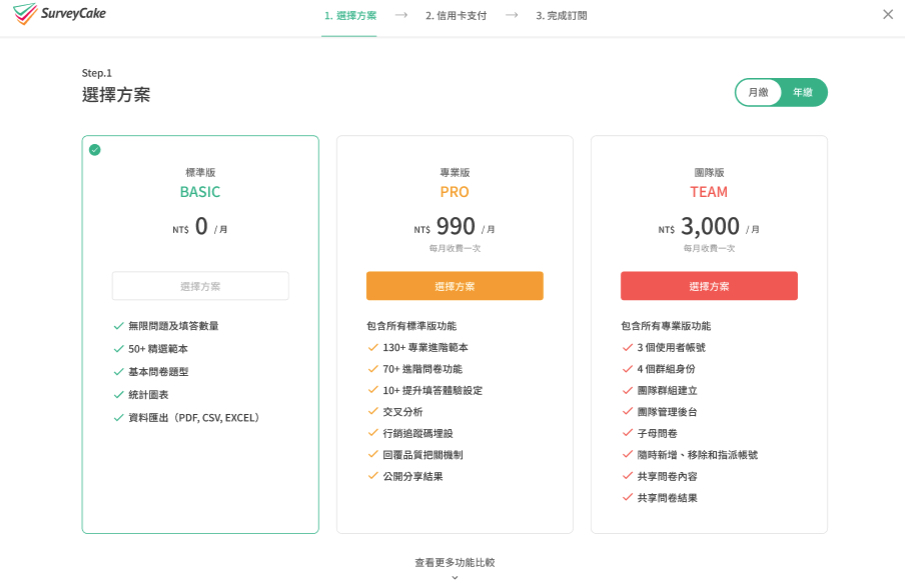

Please note that you'll need to pay the difference when upgrading your plan. Please see the detailed explanation below.
Calculating Price Differences for Immediate Upgrades
The price difference is calculated based on the remaining days of your current plan and the new plan's pricing.
When switching plans, the system calculates the difference between your current and chosen plan. This difference is charged immediately upon switching, and your new plan takes effect right away.
Here's an example of how we calculate the price difference:
Let's say you're upgrading from PRO monthly to TEAM monthly. You've already paid the PRO monthly fee of NT$990. If you switch on day 10 of your PRO subscription, the daily rate for PRO is NT$33 (NT$990/30), while the TEAM plan's daily rate is NT$100 (NT$3,000/30).
With 20 days remaining in your current period, you'll need to pay the difference for these remaining days.

The calculation works as follows:
TEAM daily rate (NT$100) × remaining days (20) minus PRO daily rate (NT$33) × remaining days (20)
Difference = (NT$100 × 20) - (NT$33 × 20) = NT$1,340
Therefore, you'll need to pay NT$1,340 to upgrade to the TEAM monthly plan.
PRO Monthly to PRO Annual Transition
When switching from PRO monthly to PRO annual, the annual plan billing will begin after your current monthly cycle ends, and the new plan will activate upon payment.
For example:
If your monthly plan expires on May 30, 2025, the annual plan will begin on May 30, 2025, with automatic billing starting on that date. Since actual billing may vary by about one day, we recommend checking your "Current Plan" in the top right corner of your Account Settings page.
FAQs



