Both the ENTERPRISE and TEAM plan offer settings for managing roles and permissions. However, TEAM only supports two types of roles: Admin and Member.
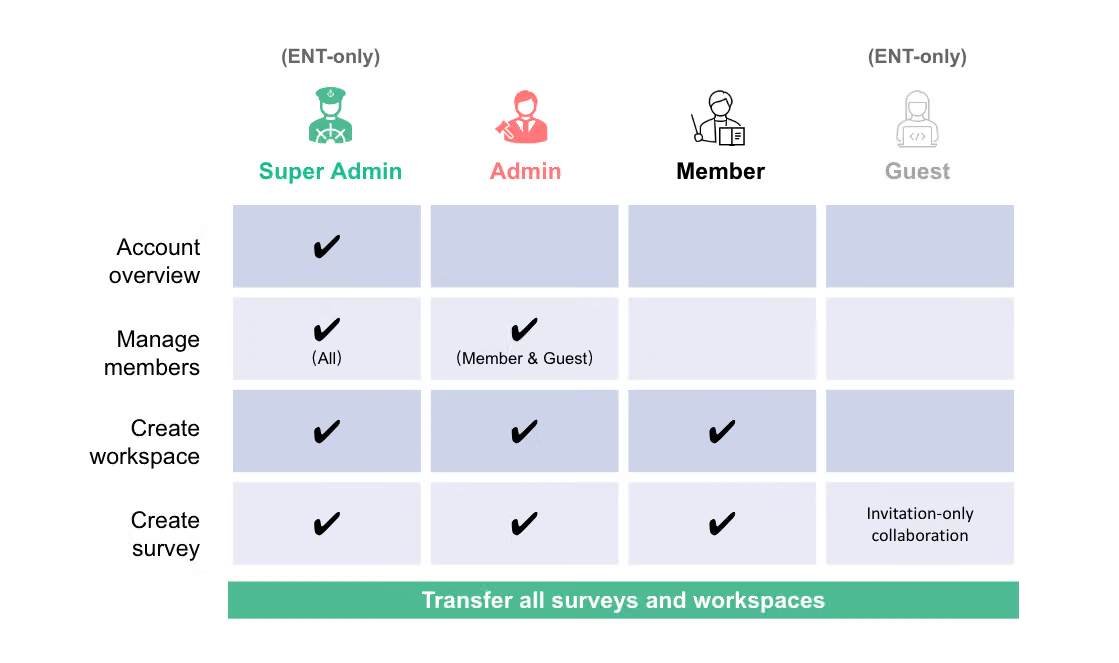
Super Admin (ENTERPRISE): There can only be one Super Admin in the ENTERPRISE plan, who holds the highest authority. The Super Admin can manage all members in the organization, edit the passwords and permissions of all user accounts, and manage all surveys.
Admin (ENTERPRISE and TEAM): The Admin of the ENTERPRISE plan is appointed by the Super Admin, while in the TEAM plan, the Admin holds the highest authority and can invite other members to join the team. The Admin of both ENTERPRISE and TEAM can manage organizational members. The Admin has access to all survey features but can only manage the passwords and permissions of members with lower authority.
Member (ENTERPRISE and TEAM): A general role, has access to all survey features and can create surveys. The Super Admin and Admin can assign regular employees as members.
Guest (ENTERPRISE): Can only be added to a survey workspace by other members and assigned collaborator roles, but cannot add a survey workspace.
Note:
Frequently Asked Questions
Member permissions refer to the individual permissions of each user in the TEAM or ENTERPRISE plan, while workspace permissions refer to the corresponding permissions of the survey workspace created in the TEAM or ENTERPRISE plan.
Member and survey workspace permissions are completely independent. Having a higher account authority does not mean you can do things beyond the granted workspace permissions (except for the Super Admin).
Example: If an Admin only has viewer permissions in workspace A, they cannot delete workspace A from the system, even if they have the highest account authority!
New member joining: For new members who need to join the team, the Admin can invite them to join in the member management of the team management backend.
Staff moving out: If there are members who need to leave the team, the Admin can remove the members in the TEAM plan from the member management page, or they can choose to leave the team in their personal settings.
During the staff handover process, the Admin needs to ensure that the new member's account permissions and group permissions are correctly set, so they can work smoothly.
No, the Admin role of the TEAM plan cannot transfer the Admin authority to other members because it is the payer.
The TEAM plan has a user limit of up to 3 people, and there is currently no mechanism for additional purchases.



