1. Default Value
Pre-filling default value for specific questions in your survey saves respondents time in answering and makes them feel that the survey was customized.
The Default Value ssn Encoding Mechanism is limited by the order in which the questions were built, and ssn will not automatically move forward even after deleting some questions. In other words, if you delete a question with default code ssn=1, the default value code of the question that takes its place will start from ssn=2.
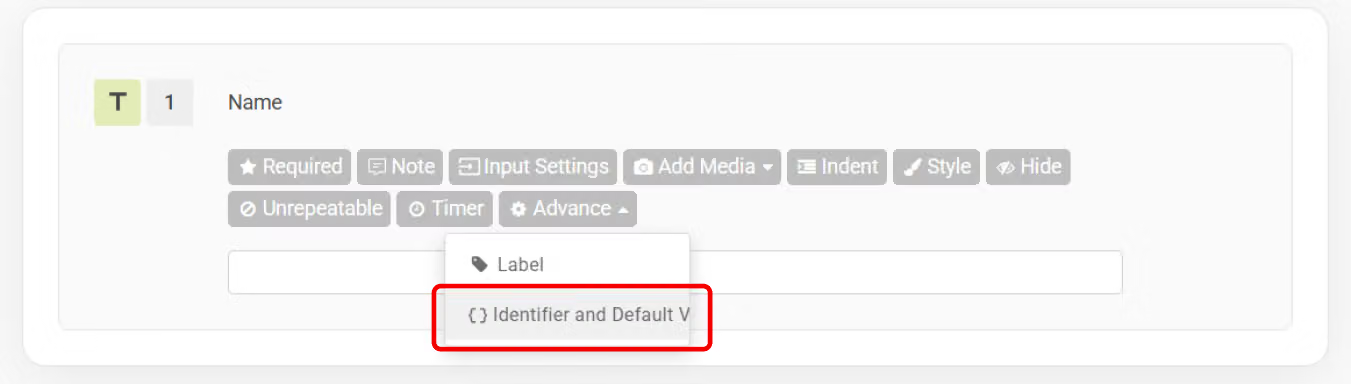
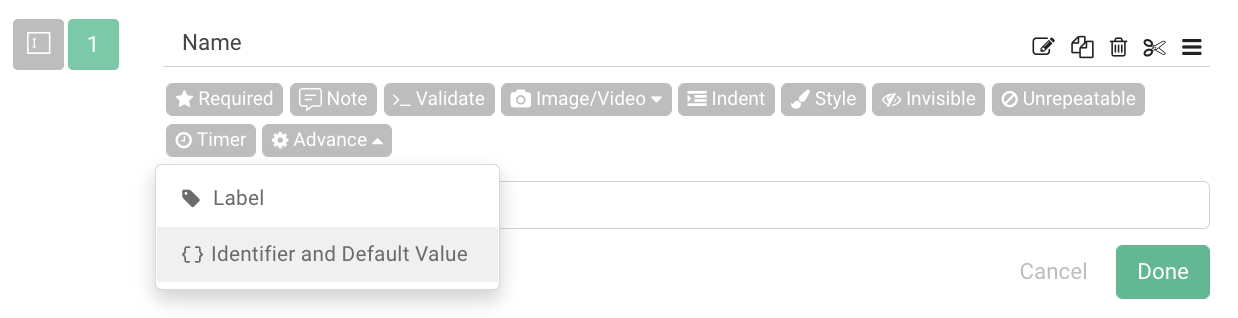
Using the Single Line Text as an example, go to the advanced options in the toolbar and select Identifier and Default Value.
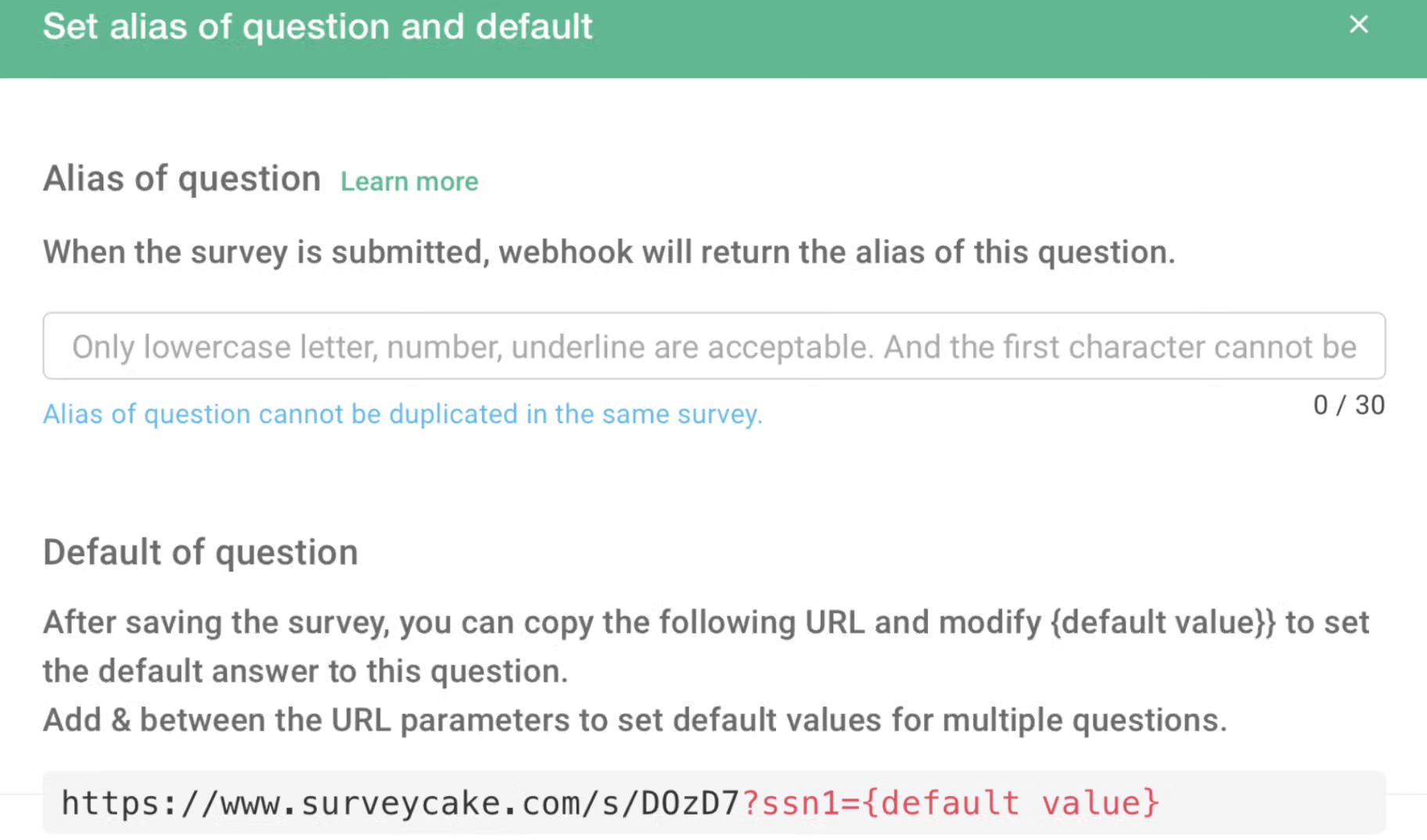
After clicking Identifier and Default Value, the setting window will pop up (as shown below). If you would like to pre-fill this question with a default value, simply enter the default value after the ?ssn0= in the URL.
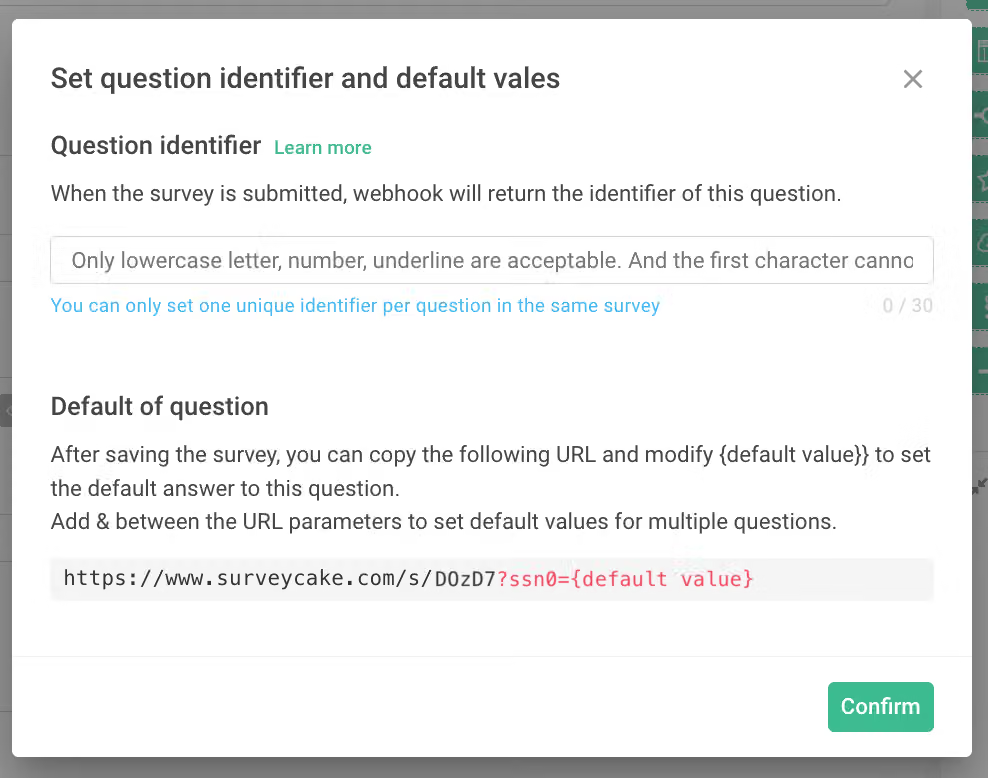
If you would like to set the default value for this first question to "John", simply type the value into the survey URL https://www.surveycake.com/s/D0zD7?ssn0=John.
Each questionnaire has its own unique ID. For example, the unique ID of this sample questionnaire is D0zD7
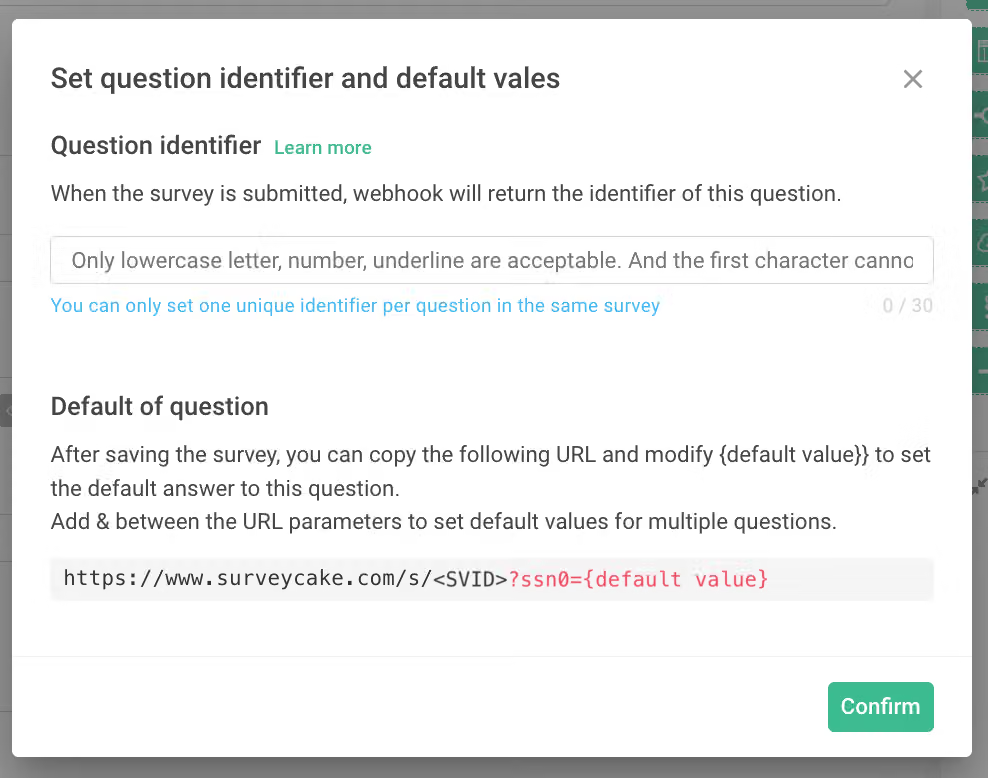
The following picture shows what happens when a survey has not been saved in advance: If you attempt to set the default values for a survey that had not been saved, the following screen appears, there is <SVID> in front of ?ssn0= instead of unique ID, and the survey will not be searchable!
Once we copy and paste the URL with default values set https://www.surveycake.com/s/D0zD7?ssn0=wang into our browser:

You can see that the first question has been pre-filled with the default value you have set upon loading the survey!
The pre-filled default value may also be freely modified during the answering process.

Please note: If Calculation Mode is enabled in your survey, the system will automatically clear the default values previously filled in for certain questions to prevent mechanism conflicts that may cause the survey to fail to open properly. This includes questions skipped by skip logic and hidden questions that are not set as Required.
If a hidden question is also set as Required, the system will automatically restore the default value when the survey is submitted.
If we want to set the default value for the second question, such as employee number, simply click on the Default Value on the function bar for the second question. If you would like to pre-fill this question with a default value, add the value behind ?ssn1= in the URL.
Multiple default values may be set all at once for any particular surveys. If you want to pre-fill several default values at the same time, string up all parameters with a symbol "&". For example, to pre-fill the first question with the default name John, and the second question with his employee number 123, string up 2 parameters with an URL looks like this https://www.surveycake.com/s/D0zD7?ssn0=John&ssn1=123
2. Identifier
The Identifier is like the Default Value. The difference is that Identifier replaces the ssn code of default with a user-defined name, which makes API connections to third-party systems easier.
As mentioned above, the ssn encoding mechanism of Default Value is limited by the order in which the questions were built, if your survey is connected to a third party system, you will have to adjust the ssn when you delete or modify the questions. However, if you use the Identifier to replace the ssn number, you don’t have to make the additional change.
Here is a detailed introduction to the Identifier:
Before Identifier is set, the default value of the question is its ssn code (as shown in the figure).
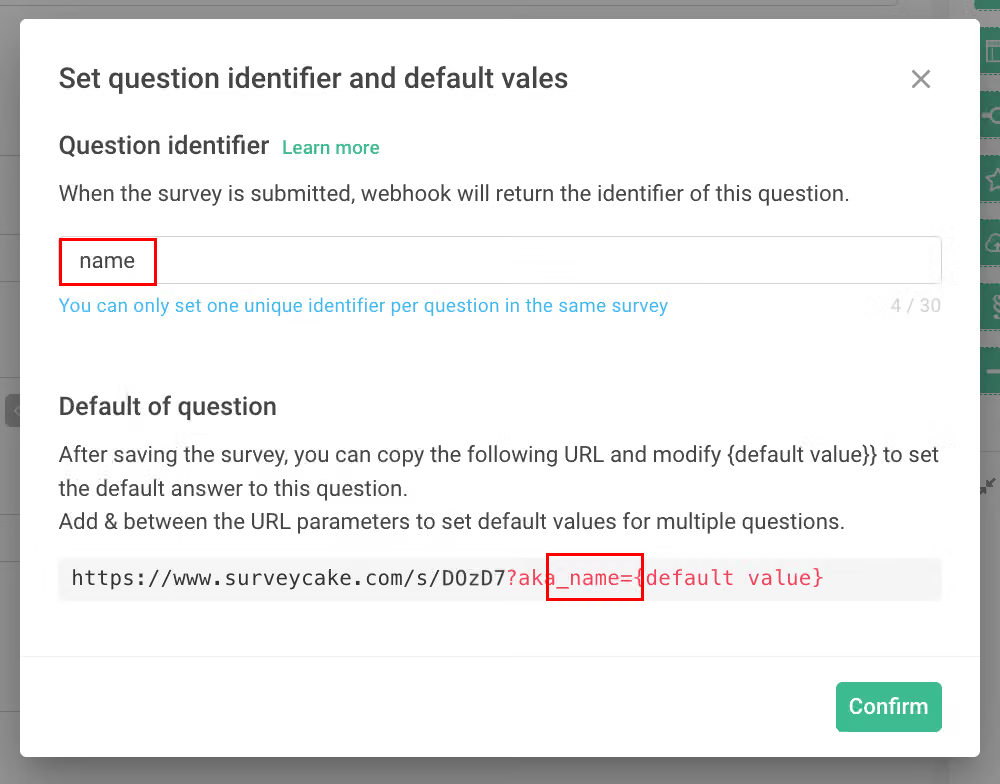
After Identifier is set, the URL below will be replaced with aka_identifier. In this way, even if the question is deleted or modified later, as long as there is a fixed Identifier, there is no need to make additional adjustments.
For example, once the Identifier of the "Name" question is set as "name", it does not matter even if the question is later deleted and replaced. As long as the Identifier of any new questions is also set to "name", the API connection will not be affected!
Note: In each survey, NO duplicated Identifiers are allowed!
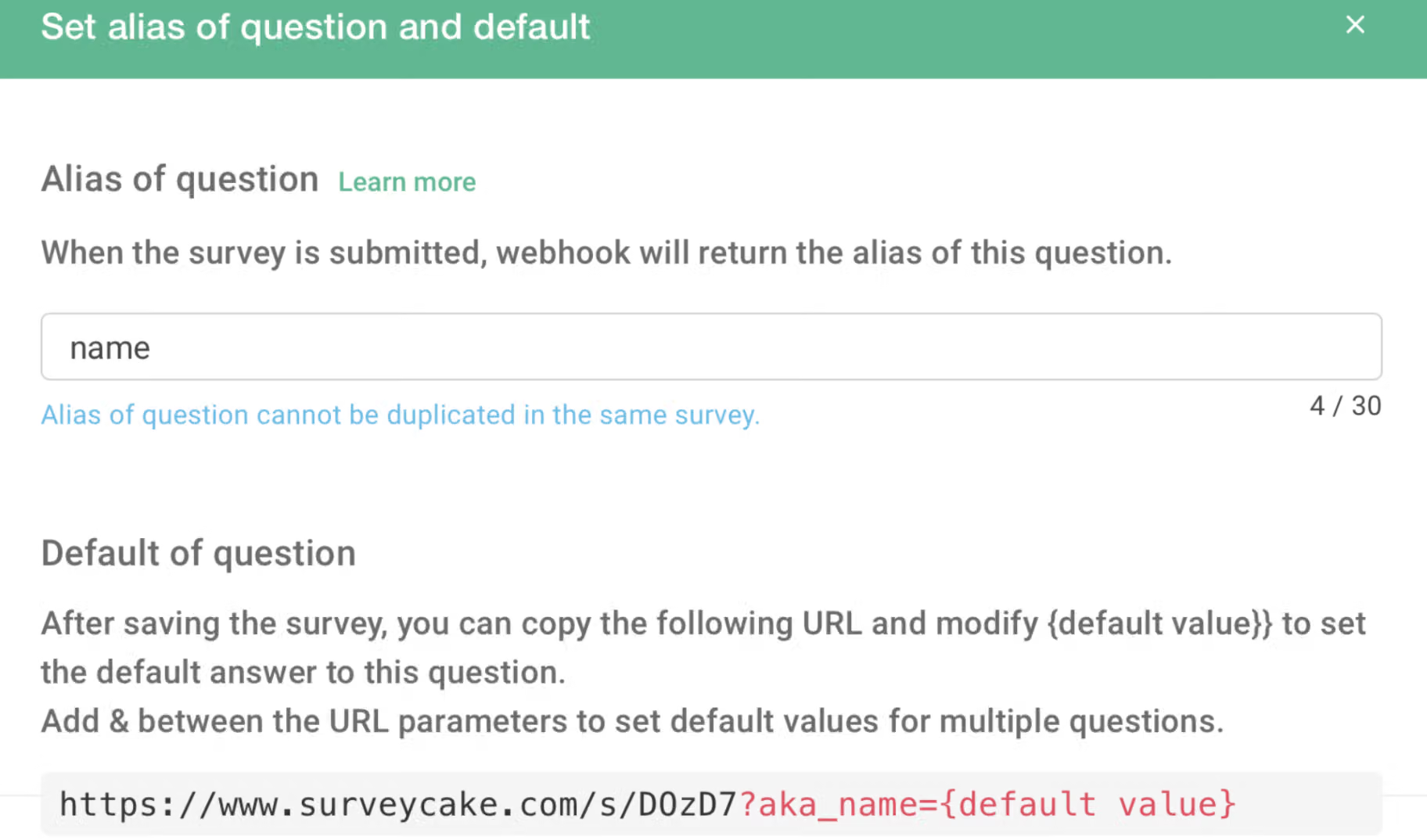
Identifier is similar to Default Value, but the difference lies in the former allowing the free setting of parameters that will make API connections easier.
FAQs
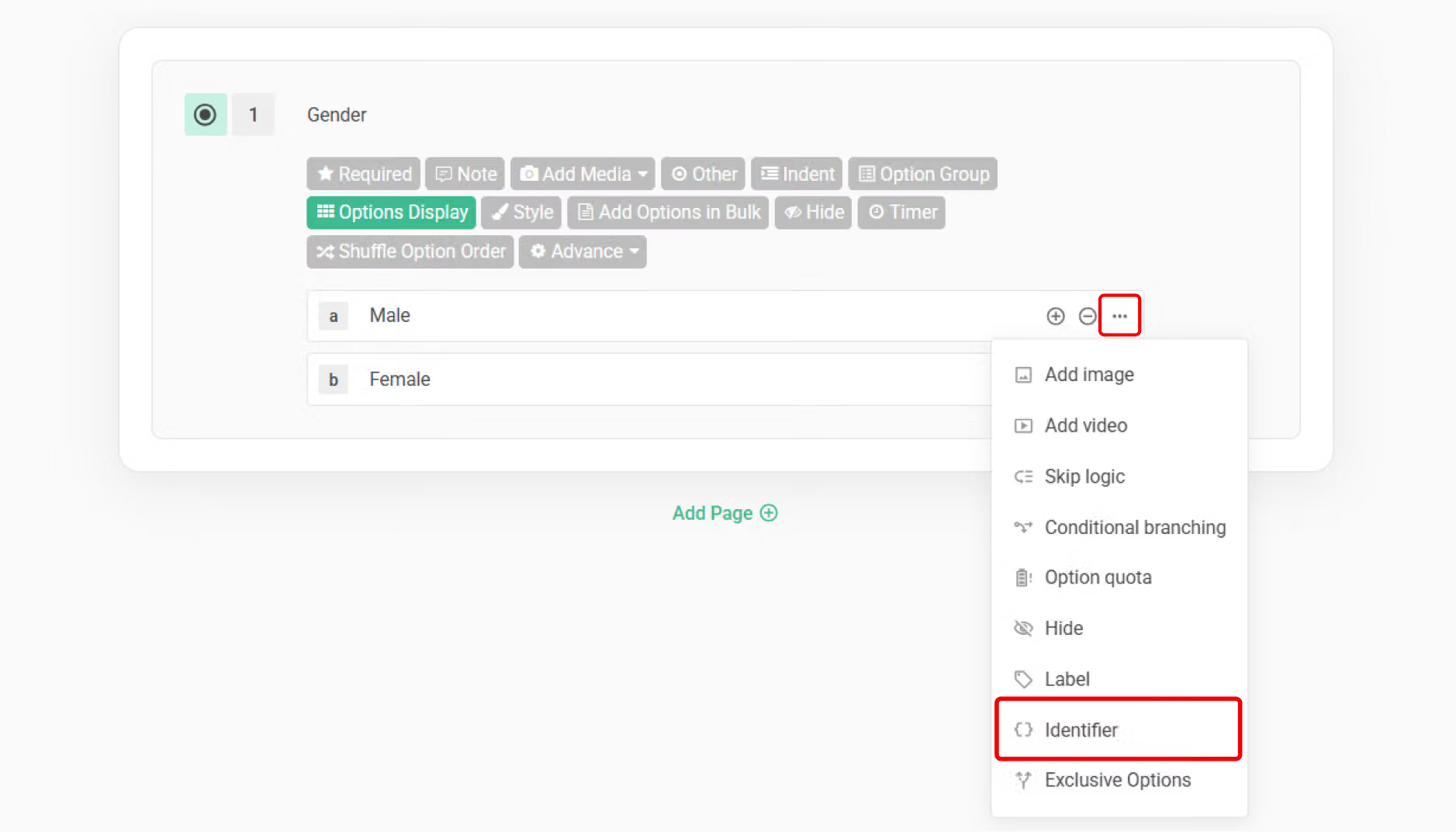
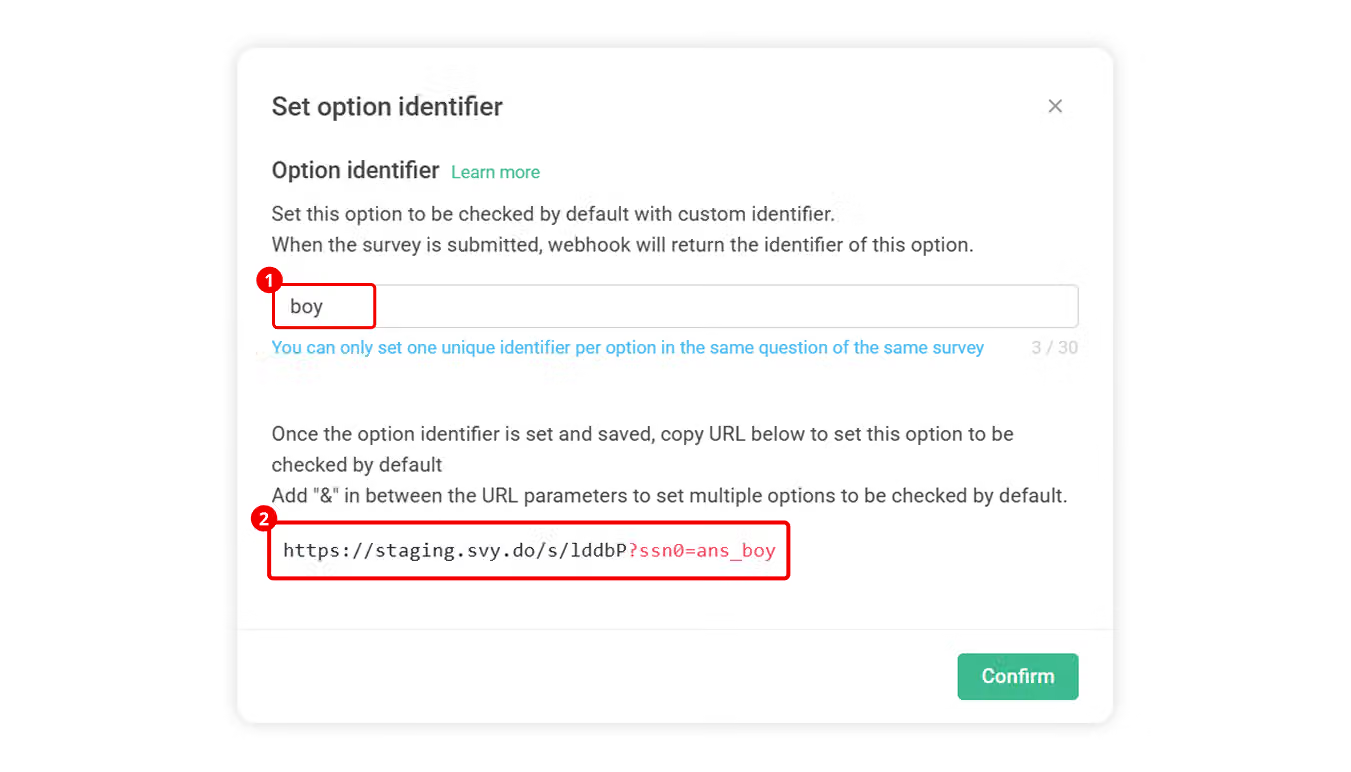
Yes, you can! Simply click the three-point menu on the right of that option, set the option's "Identifier," and then provide respondents with the complete survey URL containing the option identifier. When they enter the survey, they will see that option automatically selected!
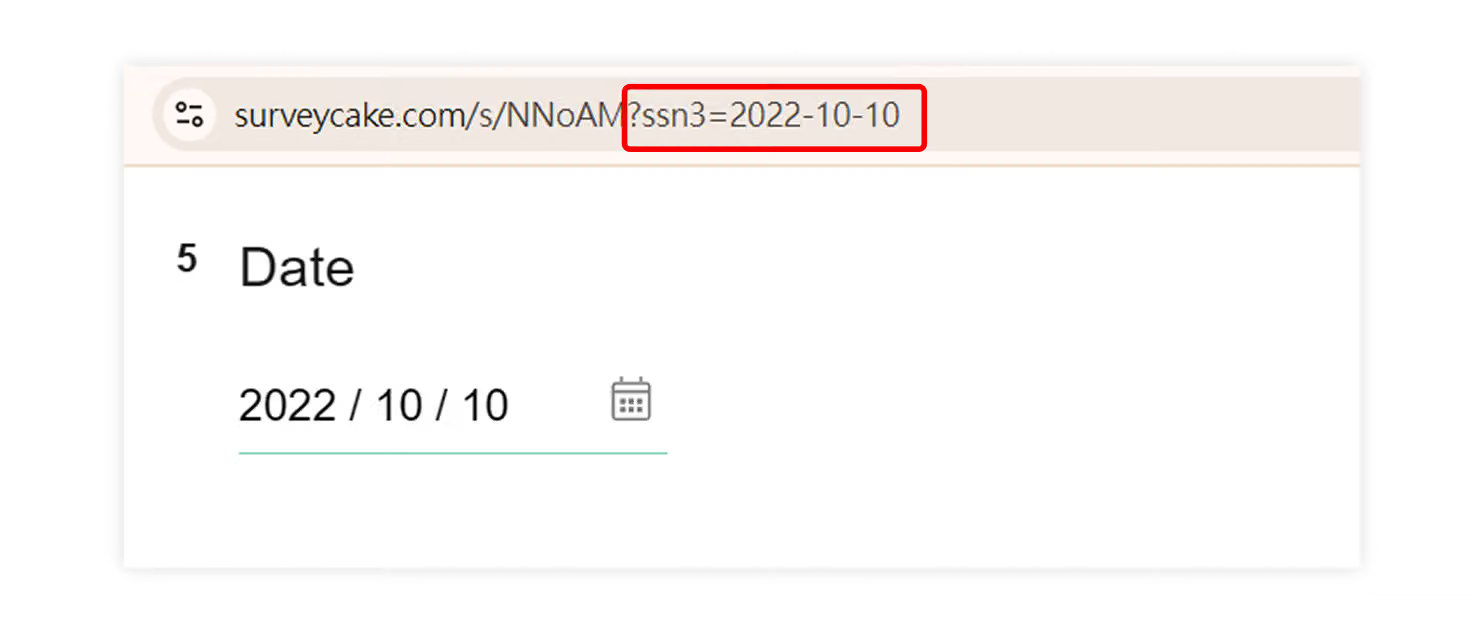
Yes, you can! Using the default value (ssn) as an example: Simply enter a specific date format xxxx-xx-xx (format: year-month-day) after ssn in the survey URL!
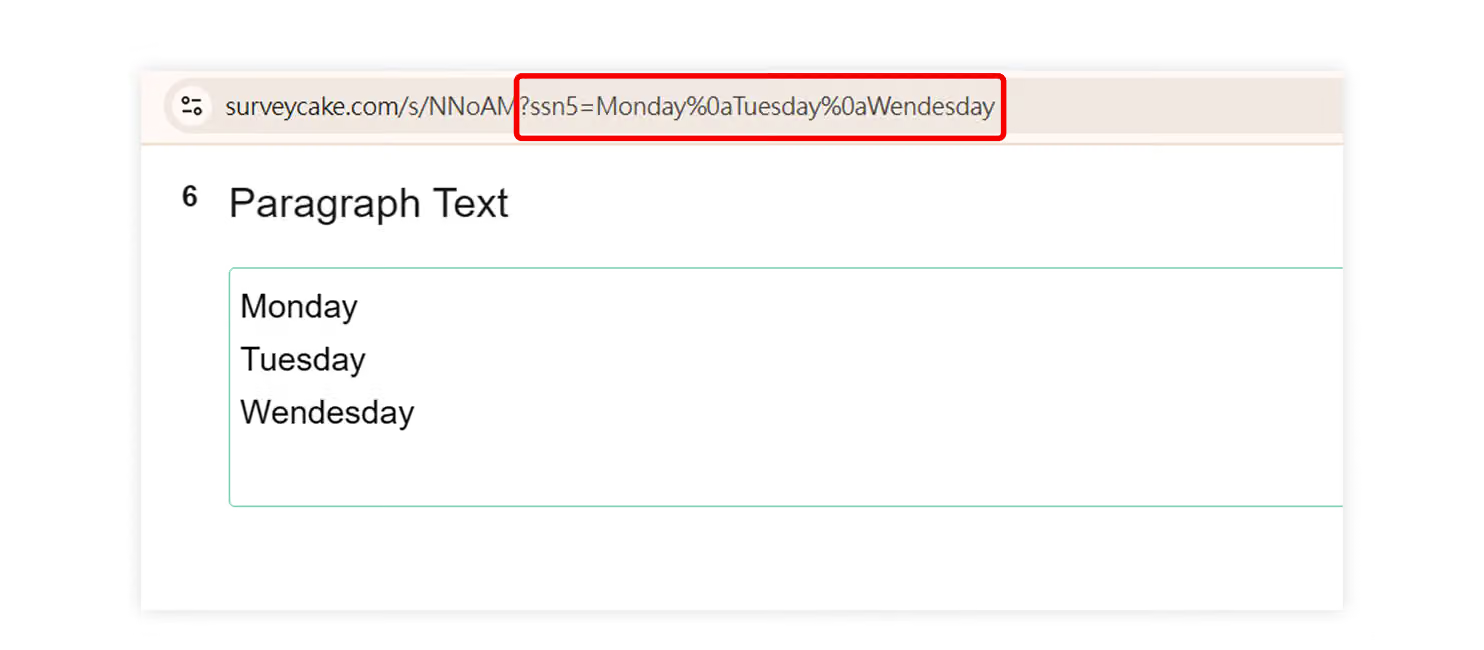
In the survey URL, simply insert the specific parameter %0a after the text where you want a line break!
It's very likely that you deleted the question that had the default value set, because if you delete a question with a default value, the survey will no longer be able to automatically input the default answer.
Additionally, even if you subsequently add a new question that is exactly the same as the deleted question, since the default value ssn number represents the order in which questions were created, the ssn number of your newly added question will not be the same as the ssn number of the originally deleted question.
The difference in ssn numbers also means you will need to re-adjust the survey URL to properly input the default answer into the new question!
Example: You originally set a default value for a name question in question 1 (ssn number 1), but later accidentally deleted question 1 and subsequently added a new name question identical to question 1 (ssn number 5). In this case, you need to modify the ssn number in the survey URL (from ssn1 to ssn5) to properly input the answer.
However, if you set an "Identifier", even if the question is accidentally deleted, you can simply recreate the same question and set the identifier to match the original one to properly input the answer again!
By making good use of the Identifier and Default Value, not only could bring in individual default values for each survey but also ensure smooth connections with third-party and create a fantastic answering experience!
版一
Enter answers into the survey in advance to create a smooth answering experience!
!blank!
Default can help you fill known answers into the survey, reducing the time it takes for the respondent to answer.
!blank!
Alias is similar to Default, but the difference lies in the former allowing the free setting of codes that will make subsequent connections or adjustments easier.
!blank!
#### Default
Pre-filling default answers for specific questions in your survey saves respondents time in answering and makes them feel that the survey was customized.
!blank!
Default ssn encoding mechanism is limited by the order in which the questions were built, and ssn will not automatically move forward even after deleting some questions. In other words, if you delete a question with default code ssn=1, the default value code of the question that takes its place will start from ssn=2.
!blank!
Using Short Response as an example, save the survey after setting up questions (remember, Default may only be set after the survey has been saved at least once) we must first save the survey to set the default value), select Default on the settings.
!blank!
!blank!
After clicking Default, **the setting window will pop up (as shown below). If you would like to pre-fill this question with default values, then simply enter the default value after the "? ssn0 = " in the URL.
!blank!
!blank!
If you would like to set the default value for this first question to "John", simply add the value into the survey URL: https://www.surveycake.com/s/D0zD7?ssn0=John
!blank!
Note: “D0zD7” is the ID of the survey used in this example. Each survey created by you will have an ID unique to that survey. This is also the reason why you need to save the survey at least once before attempting to set the default value because the newly created surveys must be saved in order to generate their own unique ID!
!blank!
The following picture shows what happens when a survey has not been saved in advance: If you attempt to set the default values for survey that had not been saved, the following screen appears, there is “
!blank!
!blank!
Once we copy and paste the URL with default values set (https://www.surveycake.com/s/D0zD7?ssn0=wang) into our browser:
!blank!
!blank!
You can see that the first question has been pre-filled with the default value you have set upon loading the survey!
The pre-filled defaults may also be freely modified during the answering process.
!blank!
!blank!
If we want to set the default value for the second question, such as employee number, simply click on the Default on the function bar for the second question to bring up the default settings window. If you would like to pre-fill this question with a default value, add the default behind "?ssn1=" in the URL.
!blank!
!blank!
Multiple default values may be set all at once for any particular survey. If you want the first and second question to have default values at the same time, you may string up the different parameters with "&". For example, to pre-fill the first question with default name John, and second question with his employee number 123, change the survey URL to: https://www.surveycake.com/s/D0zD7?ssn0=John&ssn1=123
!blank!**
Alias
The Alias is like the Default. The difference is that Alias **replaces the ssn code of default with a user-defined name, which makes connection settings to third-party providers easier.
!blank!
The Default ssn encoding mechanism is limited by the order in which the questions were built, and ssn will not automatically move forward even after deleting some questions. In other words, if you delete a question with default value code ssn=1, the default value code of the question that takes its place will start from ssn=2.
!blank!
If your survey is connected to a third-party, you will have to adjust the ssn when you delete or modify the questions.However, if you use the Alias to replace the ssn number, you don’t have to make the additional change.
Here is a detailed introduction to the Alias is as follows:
!blank!
Before Alias is set, the default value of the question is its ssn code (as shown in the figure).
!blank!
!blank!
After Alias is set, the URL below will be replaced with "aka_alias". In this way, even if the question is deleted or modified later, as long as there is a fixed alias, there is no need to make additional connection adjustments.
For example, once the Alias of the "name" question is set to name, it does not matter even if the question is later deleted and replaced. As long as the alias of the new "name" question is also set to name, the third-party serial recognition will not be affected!
!blank!
Note: In each survey, there can be no duplicate question Aliases!
!blank!
!blank!
By making good use of the Alias and Default, not only could bring in individual default values for each survey, but also ensure smooth connections with third-party and create a fantastic answering experience!



